2024 Edit
Following the discovery of other versions of 86-DOS and newer efforts, this port is now outdated. The latest ports of 86-DOS to the IBM PC are on GitHub and binaries may be downloaded from there too.
Nonetheless, this post is still worth reading because it forms the basis of my newer ports and provides context for some of my later posts.
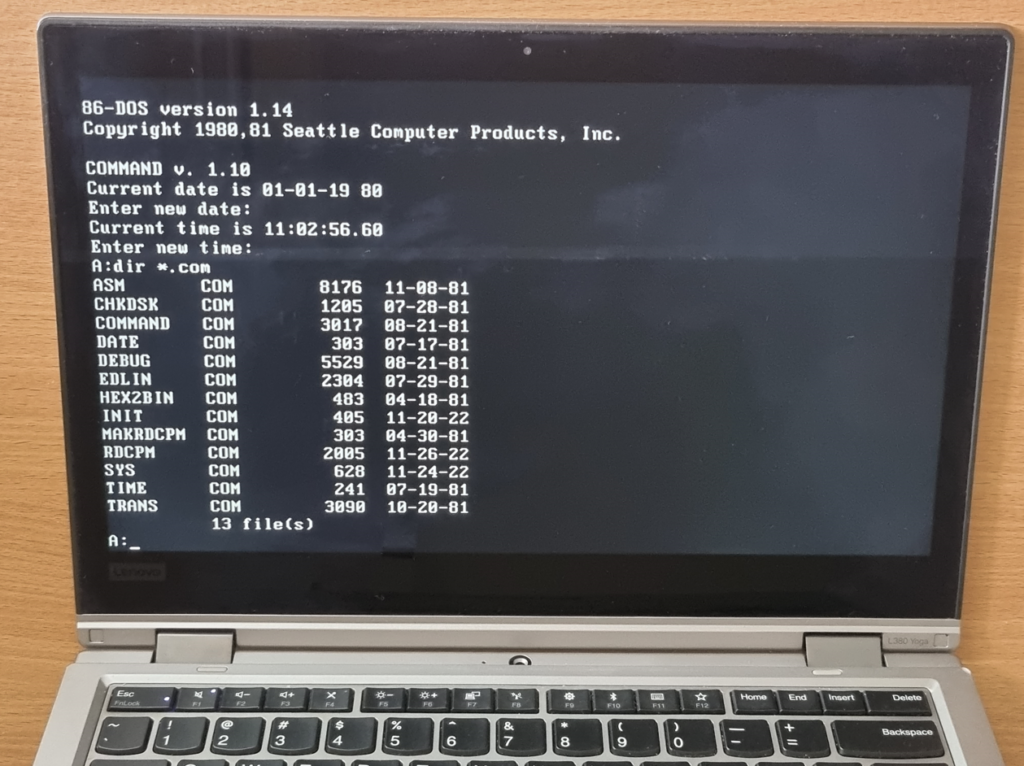
A friend challenged me to compile and boot MS-DOS 1.25 on a modern computer. But, I decided to do something slightly more challenging. Instead of MS-DOS, I decided to go with the old and proprietary 86-DOS, which never supported the IBM PC line of computers and does not have source code available. There are only two versions of 86-DOS out in the wild – 1.00 and 1.14, and I rolled with 1.14 for the task.
Why not 86-DOS 1.00? Well, it has already been done by somebody else (I’ll talk about it later).
PC-DOS 1.00 BIOS & Boot Sector Disassembly
Before I began porting 86-DOS, I created binary-exact disassemblies of PC-DOS 1.00’s IBMBIO.COM and boot sector to learn about the real-life uses of the PC BIOS interrupts. Instead of rewriting the aforementioned components from scratch, I ended up recycling the disassemblies for this port.
Getting the Files
The copy of 86-DOS 1.14 on Bitsavers is in the IBM 8-inch single-sided single-density 250.25 KiB format. Nothing can read FAT partitions with 128-byte sectors and the CP/M-style reserved system area, so I extracted the files manually. Luckily, the FAT implementation is the same as the MS-DOS/PC-DOS one and directory entries are 32 bytes in length, so it didn’t take me long to extract all 21 files.
The Files & Their Fate
Some files were modified/patched to work on the PC, some remained unchanged while others were simply removed/replaced.
| File | Description | Fate |
|---|---|---|
86DOS.SYS | 86-DOS Kernel | Patched to work on the PC. |
ASM.COM | 8086 Assembler | Standard DOS program, unchanged. |
BOOT.ASM | Boot Sector Source Code | Replace with (a modified copy of) PC-DOS 1.00’s boot sector source code. |
CHKDSK.COM | Disk Check Utility | Standard DOS program, unchanged. |
COMMAND.COM | Command Interpreter | Standard DOS program, unchanged. |
CPMTAB.ASM | RDCPM Config File | Modified to suit the reading of 5.25″ CP/M-86 disks. |
DATE.COM | DATE Utility | Standard DOS program, unchanged. |
DEBUG.COM | Debugger | Standard DOS program, unchanged. |
DOSIO.ASM | BIOS Source Code | Replaced with (a modified copy of) PC-DOS 1.00’s BIOS source code. |
EDLIN.COM | Line Editor | Standard DOS program, unchanged. |
HEX2BIN.COM | Intel Hex to Binary Converter | Standard DOS program, unchanged. |
INIT.ASM | Disk Initialiser Source Code | Extensively modified (basically rewritten from scratch) to format 5.25″ single-sided double-density disks on the PC. |
INIT.COM | Disk Initialiser | Recompiled from the modified source code. |
MAKRDCPM.COM | RDCPM Configuration Utility | Standard DOS program, unchanged. |
MON.ASM | SCP 8086 Monitor ROM Source Code | Removed, that ROM chip does not exist on the IBM PC motherboard. |
NEWS.DOC | RDCPM and INIT Notes | Updated to reflect the changes I made. |
RDCPM.COM | CP/M Disk Reader | Patched (recompiled) to read 5.25″ CP/M-86 disks instead of 8″ CP/M-80 disks. |
READTHIS.DOC | Addendum for 86-DOS 1.1 | Updated to reflect the changes I made to the operating system. |
SYS.COM | System Transfer Utility | Extensively modified (basically rewritten) to be compatible with the ported OS. |
TIME.COM | TIME Utility | Standard DOS program, unchanged. |
TRANS.COM | Z80 to 8086 Translator | Standard DOS program, unchanged. |
Of these 21 files:
- 10 remained unchanged
- 2 were replaced
- 4 (text files) were edited
- 1 was patched
- 3 were recompiled/rewritten
- 1 was deleted
An extra IO.SYS was also added to store the DOS BIOS that would normally be located in the CP/M-styled system area.
The Boot Sector (BOOT.ASM)
Instead of starting from scratch, I opted to tweak the PC-DOS 1.00 boot sector disassembly that I had cooked up earlier. I changed the hard-coded system file names from ibmbio.com to IO.SYS and from ibmdos.com to 86DOS.SYS. I also added a BIOS Parameter Block (BPB) to it and optimised the code a bit by removing some of the redundant stuff such as code for stripping the MSB from improperly defined strings and code for converting filenames to lowercase.
The DOS BIOS (DOSIO.ASM)
Just like the boot sector, I started off with my PC-DOS 1.00 BIOS disassembly. Below are the modifications I made:
- Copied the missing date and time BIOS functions over from the MS-DOS 3.30 OEM Adaptation Kit and modified them to match the same functions in the PC-DOS 1.10 BIOS.
- Removed the divide-by-zero handler (86-DOS 1.14’s kernel is capable of handling division overflows).
- Properly defined the strings (
DBinstead ofDM) and removed code for stripping the MSB. - Fixed all of the bugs I identified in Microsoft’s code.
- Replaced various constants with more meaningful expressions (
ASM2.40 can do multiplication and division of constants).
The DOS Kernel (86DOS.SYS)
Although they claimed that the kernel is completely relocatable and should work on any real hardware, it does not work on the PC. The kernel assumes that the DOS BIOS is located at segment 40H, but it’s actually located at segment 60H on the IBM PC (segments 40H and 50H are reserved for communication with the ROM BIOS and BASIC). To solve this problem, I patched the kernel to change all instances of the hard coded BIOS segment number from 40H to 60H.
After patching those hard-coded BIOS segments, I decided to give booting it a shot. And what do you know? It booted successfully! Yay!
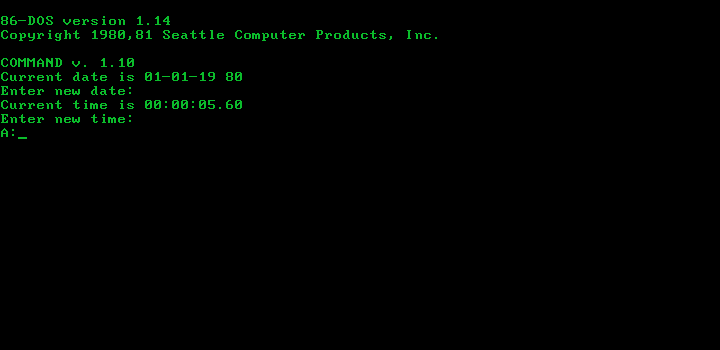
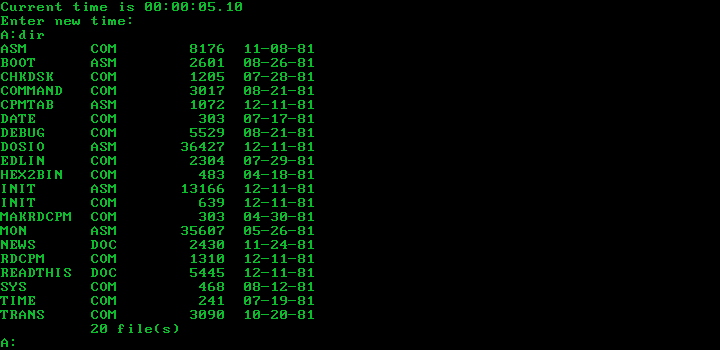
But, I celebrated too early – it locked up while listing the directory and stopped responding, even to things like Ctrl + C and Ctrl + Alt + Del :(.
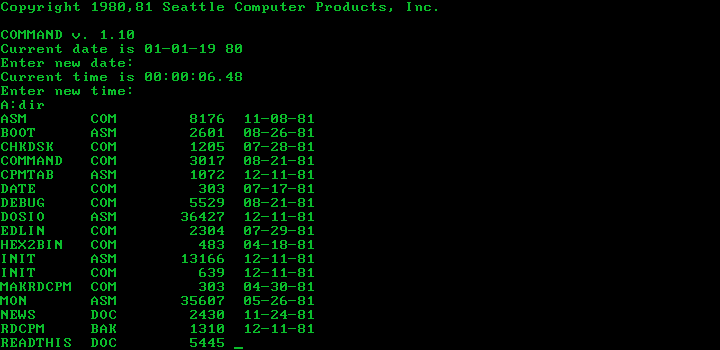
This was a rather significant problem. Pretty much everything, for example typing too fast, could hang the machine. It took me a whole day of debugging to arrive at the diagnosis that a stack overflow overwrote the saved SS and SP, causing the next return to take CS:IP to some random place in memory. But surely, Tim Paterson or somebody else tested 86-DOS 1.14 beyond just seeing it boot before releasing it to their customers, right?
The next day, I tried it in DOSBox, and interestingly enough, it did not lock up or crash. How? Shouldn’t it stack overflow? I spent the next 3 hours tracing every single instruction on the (emulated) IBM PC, and guess what? The stack overflow happened inside INT 13H! Who would’ve guessed that?
The way BIOS interrupts are handled in DOSBox is very different compared to how they are handled on an actual PC. Under DOSBox, BIOS interrupts are simulated by the DOSBox code, meaning they do not use or make changes to the stack. The real (or emulated) IBM PC, on the other hand, uses the BIOS ROM to interact with the hardware, and the ROM code uses the stack to save registers and temporary data. Since we call BIOS ROM code to perform inputs and outputs (instead of communicating directly with the hardware), a larger stack is required.
To prevent stack overflows when running 86-DOS 1.14 on the IBM PC, I increased the I/O stack (IOSTACK) size and the disk stack (DSKSTACK) size from 26H and 3CH both to 80H (same as MS-DOS 1.25). It was a straightforward patch since the stack area was at the very end of the binary. I simply changed the values to be put into the SP register and modified a few adjustment factors. And as expected, the stack overflows and lockups disappeared!
I also customised the special editing commands to align with those of PC-DOS 1.00, as OEMs and users were intended to tailor them to their terminals or needs. Since 86-DOS does not support insert mode toggling, I assigned the F9 key as the enter insert mode key and the F10 key as the exit insert mode key. In PC-DOS, the INS key is used to toggle insert mode on/off. This is the only difference between the editing commands of my 86-DOS 1.14 port and PC-DOS 1.00. Here is a list of the special editing commands for my 86-DOS 1.14 port in case you are not familiar with the PC-DOS ones:
| Key | Function |
|---|---|
F1 | Copy one character from template. |
F2 | Copy up to specified character. |
F3 | Copy rest of template. |
F4 | Skip up to specified character. |
F5 | Cancel line and update template. |
F6 | Kill line (no change to template). |
F7 | Escape sequence to represent escape character. |
F8 | (Unused) |
F9 | Enter insert mode. |
F10 | Exit insert mode. |
<—— | Backspace (same as Ctrl + H). |
——> | Copy one character from template (same as F1). |
DEL | Skip over one character in template. |
The Disk Initialiser (INIT.ASM/INIT.COM)
Unlike PC-DOS or MS-DOS, 86-DOS did not come with FORMAT. Instead, you need to use its low-level disk formatter/initialiser called INIT. INIT is much simpler compared to FORMAT, it only performs a low-level format of the disk. You must use the internal CLEAR command to place the FAT and root directory onto the formatted disk, and the SYS command to copy the system files and boot sector. SCP’s INIT never supported the NEC µPD765 floppy disk controller used by the IBM PC, so I essentially rewrote it from scratch. The good thing is that the PC BIOS ROM takes care of all the hard work, so I managed to make it work by simply executing a few INT 13H calls. Here is a basic description of the two functions I wrote:
| Function | Description |
|---|---|
FMTTRK | Formats a track. On entry, AL = track number, AH = head number, CL = sectors per track, CH = sector size (0 = 128, 1 = 256, 2 = 512, 3 = 1024), DL = drive number, DH = number of retries and ES:BX points to a buffer with 4 × CL bytes of free space. |
FMTDSK | Formats a 5.25″ SSDD floppy disk. 40 tracks starting from 0 is formatted to each contain eight 512-byte sectors using the FMTTRK function. |
I only tested it inside emulators, but it should be able to format physical floppy disks too.
The System Transfer Utility (SYS.COM)
This one took me quite some time. The original SYS tool copies the first track of the disk in drive A along with 86DOS.SYS onto the destination disk. In my IBM PC port, SYS needs to copy solely the first sector of the first track (the boot sector) along with both IO.SYS and 86DOS.SYS. I disassembled the original SYS.COM and essentially rewrote it, staying true to the original code. The new SYS now behaves differently depending on the state of the disks, with four possible states:
Is IO.SYS on Destination Disk | Is 86DOS.SYS on Destination Disk | Outcome and Description |
|---|---|---|
| No | No | Can proceed. Must check to see if there are other files on the disk. If no other files are found, the disk is considered blank. If other files are found, then it is unlikely for the first few sectors and the first two directory entries to be free. Proceed if the disk is blank, otherwise throw an error. |
| Yes No | No Yes | Cannot proceed. Either IO.SYS or 86DOS.SYS is on the disk, but not both. If IO.SYS is the first entry and the first file on the disk, and we have enough space for DOS (the second directory entry is free, and there are enough free sectors following IO.SYS), then the disk can be turned into a system disk, but that is highly unlikely. Simply throw an error. |
| Yes | Yes | Can proceed. The disk will refuse to boot correctly if IO.SYS and 86DOS.SYS are not the first two entries and files. The system files on the destination disk must not be smaller than the system files on the source disk.This version of SYS does not check for the positions of the system files and their sizes, therefore the user should be aware of the limitations. |
While it may sound quite limited, in reality, it handles all the cases that the original SYS is capable of handling. By the way, just like the original SYS, it does not copy the date stamps of the system files. Adding features or fixing bugs isn’t really a part of porting something – I want ported apps to behave in the exact same way, just on a different computer/platform.
CP/M Disk Reader (RDCPM.COM and CPMTAB.ASM)
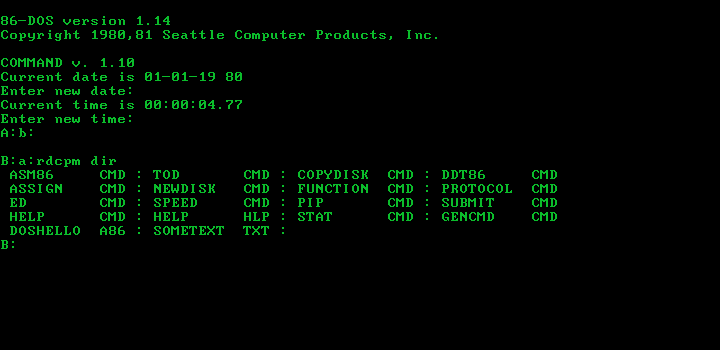
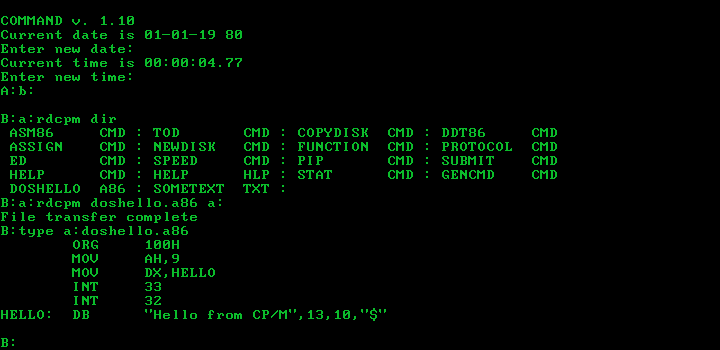
This utility took even longer to port than SYS. It’s supposed to copy files from CP/M-80 disks to 86-DOS disks, but the IBM PC does not support reading 8″ CP/M-80 disks, at least not without hacks. So, I decided to make it read CP/M-86 disks instead. In theory, modifying CPMTAB.ASM alone should be enough to make RDCPM read CP/M-86 disks (both CP/M-80 2.2 and CP/M-86 1.0 used the same filesystem), but in reality it’s not that simple. With that said, here is the standard definition for the 8 SPT 5.25″ SSDD format used by CP/M-86:
;Below is the definition for standard double-density 5.25" drives

IBM:
	DW	32	;Sectors per track
	DB	3	;Block shift
	DB	7	;Block mask
	DB	0	;Extent mask
	DW	155	;Disk size - 1
	DW	63	;Directory entries - 1
	DS	4	;Not used
	DW	1	;Tracks to skip
	DW	MOD32	;Modulo-32 sector translate table

MOD32:
	DB	00,01,02,03,04,05,06,07
	DB	08,09,10,11,12,13,14,15
	DB	16,17,18,19,20,21,22,23
DB 24,25,26,27,28,29,30,31The reason why simply replacing the original table with this table wouldn’t work is that RDCPM treats the SPT field of the CP/M Disk Parameter Block (DPB) as the number of physical sectors per track, not the number of 128-byte records that it’s supposed to be treating as. Furthermore, the physical sector size must also be 128 bytes, as it uses INT 25H for reading.
I was stuck on this issue for an entire weekend before I came up with the idea of adding buffered I/O to RDCPM. One of the paragraphs from the 86-DOS 0.3 Programmer’s Manual says:
[…] Thus if disk I/O is being buffered in memory, as would be the case if physical sector size is greater than 128 bytes […]. Version 1.0 of 86-DOS will automatically handle physical sector sizes larger than 128 bytes and buffering in the I/O area will no longer be necessary.
It’s not hard to deduce that 86-DOS 0.3 did not support physical sector sizes larger than 128 bytes, so I/O buffering was necessary for disks with larger sectors. It’s almost identical to the current situation – if sector buffering tricked 86-DOS 0.3 into believing that it’s operating on a disk with 128-byte physical sectors, RDCPM can be tricked into believing the same thing too.
How does I/O buffering work? Let’s assume logical sectors are 128 bytes and physical sectors are 512 bytes. Say that the RDCPM program wants to read logical sector 98, I will have to read in physical sector 24 (⌊98 ÷ 4⌋), divide it into 4 virtual 128-byte sectors in memory and return virtual sector 2 (98 – 24 × 4). If RDCPM is doing a sequential read and now wants logical sector 99, I can simply return virtual sector 3 of the physical sector currently in memory. When it asks for logical sector 100, I’ll have to read in physical sector 25 (⌊100 ÷ 4⌋) and return virtual sector 0 of it… and so on.
I spent some time on a binary-exact disassembly of RDCPM so that I could make changes at the source code level. Afterwards, I added two functions:
;Reads a physical sector
READPHYS:
	PUSH	BX
	MOV	BX,PHYSBUF
	PUSH	BP
	INT	25H
	POP	AX		;Throw saved flags away
	POP	BP
	POP	BX
	RET

;Copy 128 bytes from physical buffer to DS:BX
;AL = 0 1 2 3
BUFFCPY:
	PUSH	SI
	PUSH	DI
	MOV	DI,BX
	MOV	SI,PHYSBUF
	OR	AL,AL
	JZ	DOBUFCPY

	PUSH	AX
INCPTR:
	DEC	AL
	ADD	SI,128
	OR	AL,AL
	JNZ	INCPTR
	POP	AX

DOBUFCPY:
	PUSH	CX
	MOV	CX,64
	REP
	MOVSW
	POP	CX
	POP	DI
	POP	SI
RETThe READPHYS function reads a physical sector into the 512-byte physical sector buffer. The BUFFCPY function copies a virtual 128-byte sector to DS:BX, taking AL as the index of the virtual sector.
After adding these two functions, I modified the disk reading routine to work out whether a new physical sector should be read, and which virtual sector needs to be returned. I changed the following lines of the disk reading function:
	PUSH	BP
	INT	25H
	POP	AX		;Throw saved flags away
	POP	BP
JNC READDONEto:
	JP	FINDSECT

UPDBUF:
	MOV	[LASTREAD],DX
	MOV	B,AL,[SRCDRIVEID]
	CALL	READPHYS
	POP	DX
	JC	READERR

FINDSECT:
	MOV	AX,DX
	PUSH	DX
	SHR	DX
	SHR	DX
	CMP	DX,[LASTREAD]
	JNZ	UPDBUF
	SHL	DX
	SHL	DX
	SUB	AX,DX
	POP	DX
	CALL	BUFFCPY
	JMP	READDONE

READERR:Basically, instead of reading the 512-byte physical sector DX to the 128-byte buffer pointed to by DS:BX, I made it:
- Take the floor of
DX÷ 4 (which gives the index of the physical sector to read) and compare it against theLASTREADvariable (which contains the index of the current physical sector in memory). - If the physical sector to read is the same as the current physical sector in memory, then work out the index of the virtual 128-byte sector, put it in
ALand callBUFFCPYto copy it toDS:BX. - If the physical sector to read is not the same as the current physical sector in memory, then read the desired physical sector before copying the desired virtual sector to
DS:BX.
After making the above changes, I recompiled the program and tested it with a CP/M-86 disk. It worked perfectly.
Bashing the Last Bug
Two days after I thought I had finished the port, I realised I hadn’t actually tested third-party programs. Later that day, I gathered a few period-correct (released in 1981) programs and ran them under this IBM PC port of 86-DOS 1.14.
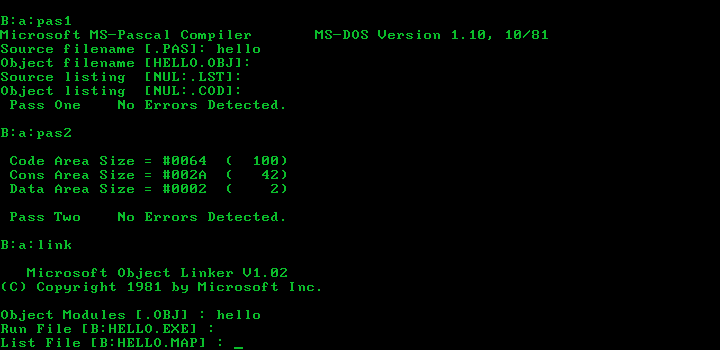
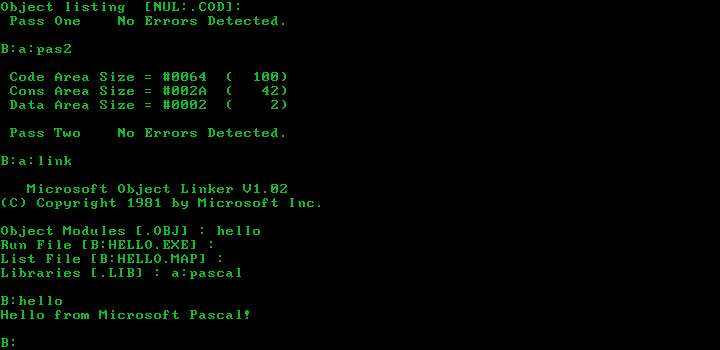
A pre-release of Microsoft Pascal from late 1981 (disk 1, disk 2) is on Bitsavers. I copied the files onto four 160 KiB disks, fired it up, and it worked flawlessly.
That gave me some confidence, so I went ahead and tested all the other programs I managed to find.
I tried both versions of Microsoft BASIC 5.21 under my PC port of 86-DOS 1.14. The newer version from November caused the system to lock up, and according to the readme, it expects more than 64 KiB of RAM. So, I turned my attention to the older version from August, and it worked… well, not really.
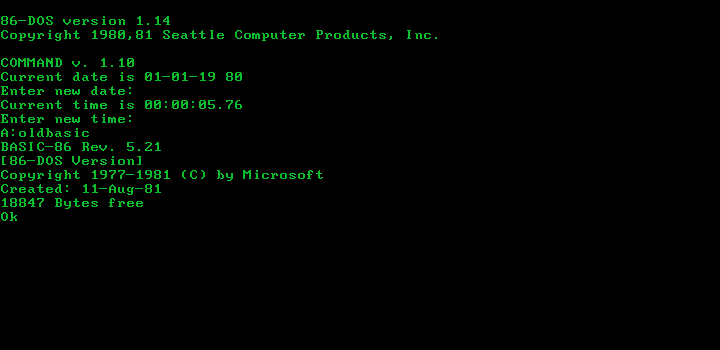
It appeared to be working, but after typing in about three characters, the screen filled up with repeated patterns of random characters, and then it stopped responding.
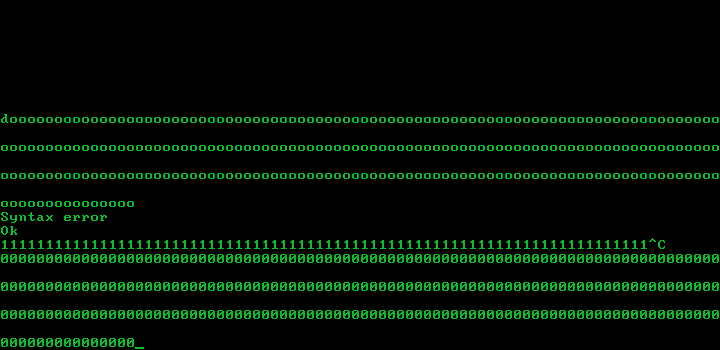
I then increased the system RAM to 128 KiB and tested the November version, the same problem as the August version. Maybe it’s an emulator bug? Nope, inside the same emulator, both versions worked perfectly fine under PC-DOS 1.00 and PC-DOS 1.10.
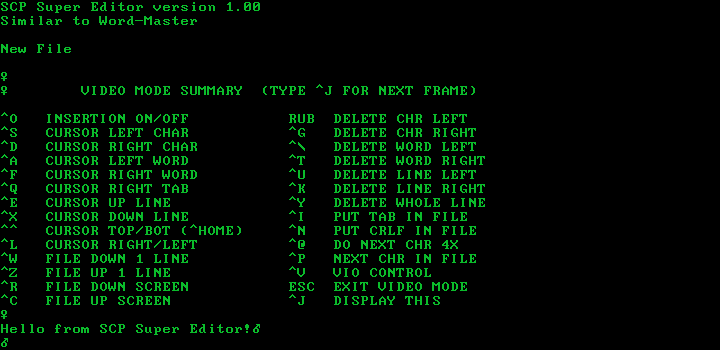
I didn’t know what to do, so I simply moved on and tested the next program, SCP Super Editor 1.00. It is a knock-off of Word-Master – the program itself literally says that. I booted up 86-DOS 1.14 and launched WM.COM (yes, the exact same name as Word-Master’s executable) to create a new document. At first glance, it was working correctly.
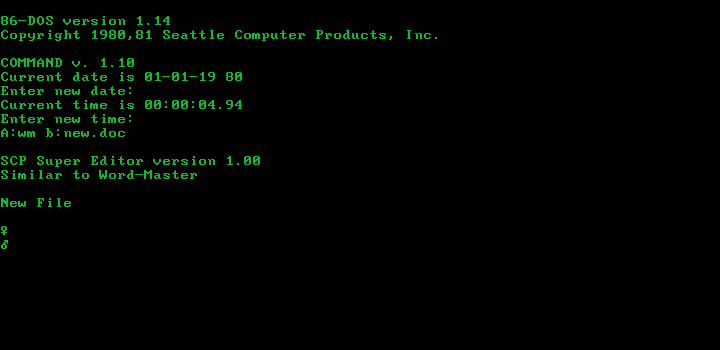
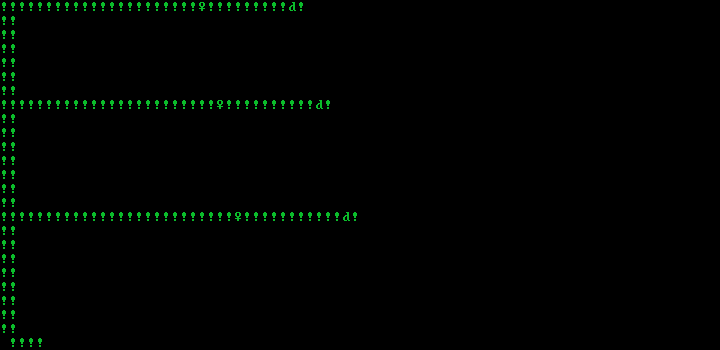
But after pressing a key on the keyboard, it started typing random characters and exclamation marks on its own.
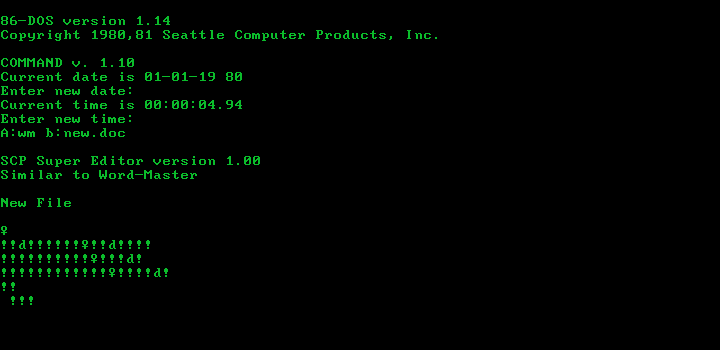
And after a while, it started filling the screen up with this weird pattern:
I rebooted the machine and opened up an existing document. To my amazement, it… worked. But, of course, not in the intended way.
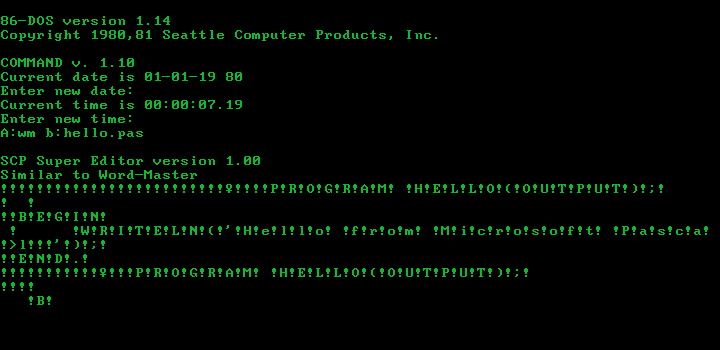
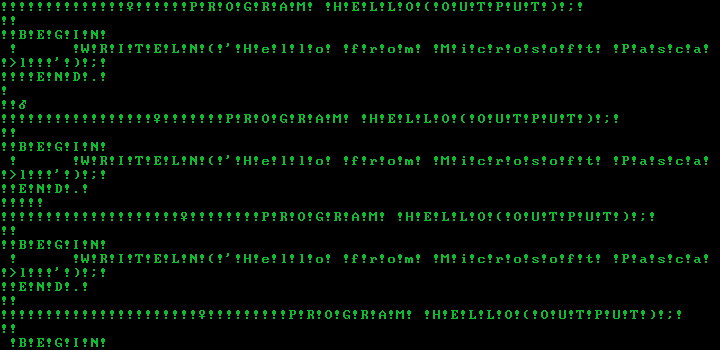
It did actually display the document, but with an exclamation mark in between each character. Also, it did not stop printing characters to the console after reaching the end of the document. After about a minute, the screen got filled up with the same thing repeated over and over.
I then tested it under PC-DOS 1.00, and just like BASIC, it worked impeccably. Bruh. I spent the rest of that day debugging the problem, but unfortunately, I didn’t manage to find anything useful. The next day, I stopped debugging the programs and started comparing the PC-DOS 1.00 and 86-DOS 1.14 kernels in IDA. The kernels are actually quite similar, except for differences in the undocumented DPB structure and file I/O routines, where the 86-DOS kernel checks the first byte of the FAT for 0xFF, perhaps to support disks with 16-byte directory entries. I ignored those differences and kept comparing until I hit syscall 11 (internally called CONSTAT). It’s at offset 0x1118 in the PC-DOS 1.00 kernel and at offset 0x11FD in the 86-DOS 1.14 kernel.
86-DOS 1.14’s CONSTAT function:
CODE:11FD CONSTAT:
CODE:11FD                 call    far ptr 40h:3   ;STATUS
CODE:1202                 jz      short RET19
CODE:1204                 or      al, 0FFh
CODE:1206 retnPC-DOS 1.00’s CONSTAT function:
CODE:1118 CONSTAT:
CODE:1118                 call    far ptr 60h:3   ;STATUS
CODE:111D                 mov     al, 0
CODE:111F                 jz      short RET19
CODE:1121                 or      al, 0FFh
CODE:1123 retnThe difference is quite easy to spot – PC-DOS 1.00’s CONSTAT function moves 0 into the AL register after calling the STATUS function. The official documentation of the CONSTAT function says:
11 – Check console status. If a character is waiting at the console, AL will be FF hex on return. Otherwise, AL will be 00.
And the documentation of the STATUS function states:
STATUS – Console input status
If a character is ready at the console, this routine returns a non-zero value in AL and the zero flag is clear. If no character is ready, AL returns zero and the zero flag is set. No registers other than AL may be changed.
Hold on, if no character is ready, then AL should be 0 after returning from STATUS, right? So why move 0 to AL again? The extra MOV AL,0 instruction in PC-DOS 1.00’s CONSTAT function seems redundant… but is it? Let’s take a look at PC-DOS 1.00’s STATUS function:
;
; STATUS - Console input status
;
; AL contains the returned character, all other registers must be
; preserved. ZF set if character not ready, otherwise ZF is cleared.
;
STATUS:
	SEG	CS
	MOV	AL,[LASTCHAR]	;Fetch the last returned char
	OR	AL,AL		;Get flags for it
	JNZ	STATUSRET	;Last char is not 0, return it
	PUSH	DX		;Save DX
	XCHG	AX,DX		;Save value of AX to DX
	MOV	AH,1		;Function = get keystroke status
	INT	16H		;Call keyboard BIOS service
	JZ	STATUSDONE	;No key pressed
	CMP	AX,7200H	;Check if key is CTRL + PRTSCR
	JNZ	STATUSDONE	;No, skip the next bit
	MOV	AL,10H		;Yes, set to CTRL + P
	OR	AL,AL		;Get ZF for the character

STATUSDONE:	;Restore registers for STATUS
	MOV	AH,DH		;Restore AH from value saved in DX
	POP	DX		;Restore saved DX

STATUSRET:
RET LWait a minute, after calling INT 16H, if ZF is set (no character is ready), it simply returns. What about the value of AL? The documentation of INT 16H doesn’t say anything about the content of the AX register if no character is ready, so shouldn’t AL be explicitly set to 0 before returning, as stated in the documentation of the STATUS function? Another PC-DOS BIOS bug, eh?
Interestingly enough, Microsoft fixed it by making changes to the DOS kernel. Well, they had the source code for both the BIOS and the kernel, so for them, it really didn’t matter which one to change.
I don’t have the source code for the kernel, so I modified the STATUS function to return 0 if no character is ready.
	...
	INT	16H		;Call keyboard BIOS service
	JZ	NOKEYPRES	;No key pressed
	CMP	AX,7200H	;Check if key is CTRL + PRTSCR
	JNZ	STATUSDONE	;No, skip the next bit
	MOV	AL,10H		;Yes, set to CTRL + P
	OR	AL,AL		;Get ZF for the character
	JP	STATUSDONE	;Done

NOKEYPRES:	;Clear AL before returning
	MOV	AL,0

STATUSDONE:	;Restore registers for STATUS
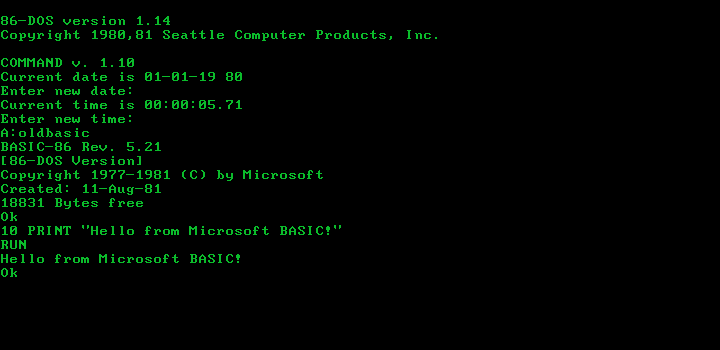
...Recompiled the BIOS and tested Microsoft BASIC again. I think this screenshot speaks for itself:
What about the SCP Super Editor?
Mission Complete – 86-DOS 1.14 on Modern Computers
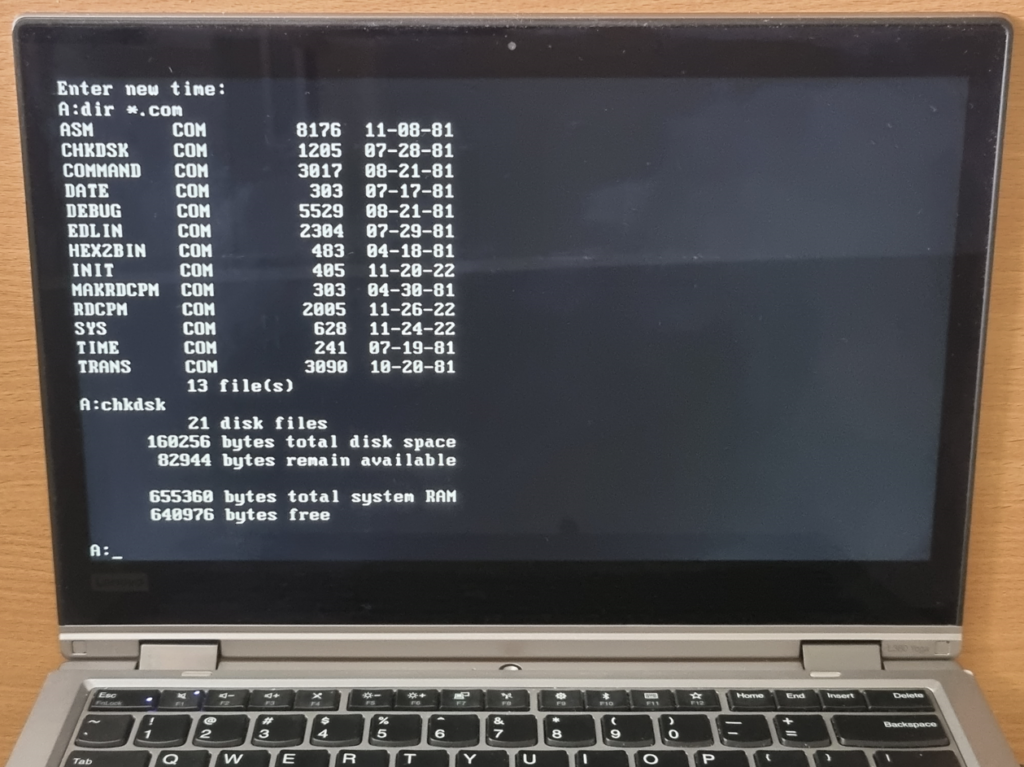
Some of you may have wondered why on Earth I would port this ancient OS to an ancient computer when the challenge is to boot it on a modern computer. Well, this may surprise you a bit, but most modern x86 computers we use today are descendants of the IBM PC line of computers and hence compatible with the IBM PC. So, if things didn’t totally screw up, this IBM PC port of 86-DOS 1.14 should work out of the box on all modern x86 PCs.
You can actually copy 160 KiB floppy disk images to USB sticks, and funnily enough, Windows happily mounts it.
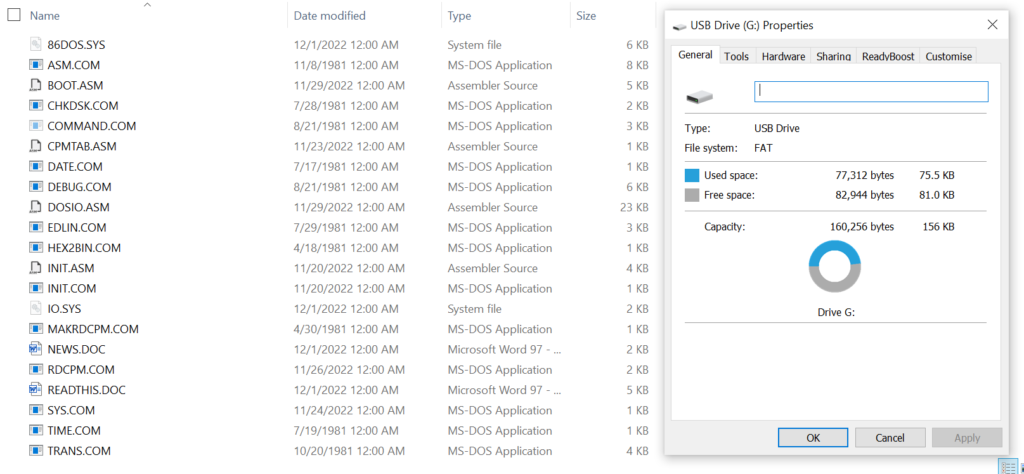
Alright, moment of history:
A 1.44MB Version
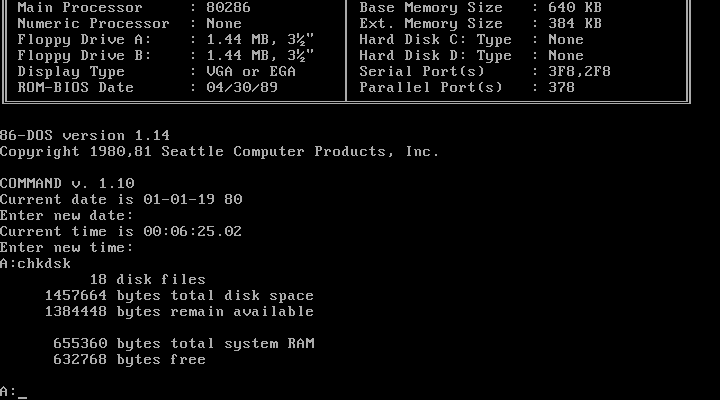
I’ve also created a 1.44 MB version of 86-DOS 1.14. Yes, you heard it right, 1.44 MB. No, I didn’t merely copy the 160 KiB disk to the first 8 sectors of the first 40 tracks of the first side of a 1.44 MB disk, I actually made it support 1.44 MB disks. While it does function, please keep in mind the following limitations:
- It will not boot from or correctly read/write disks in other formats (including 160 KiB).
- It does not have the
RDCPMutility, because as far as I know, CP/M never officially supported 1.44 MB disks. - I didn’t test it much, so you may encounter bugs.
Download This Project
Download the IBM PC version of 86-DOS 1.14 here. Files included:
86-DOS 1.14.img: A disk image of this IBM PC port of 86-DOS 1.14. Inside the disk image you can find the source code of the boot sector, DOS BIOS and theINITprogram, just like the original distribution of 86-DOS 1.14.[Disks With Misc. Files]MiscCPM.img: A CP/M-86 disk image with 4 text files (taken from the VisiCalc IV 2.0 demo). You may use this disk to test theRDCPMprogram.MiscFiles.img: A disk image containing various documents, binaries, and source code that I used throughout the project.
Download an archive of 86-DOS 1.14 software here. Software included:
- Microsoft BASIC-86 5.21: BASIC-86 for 86-DOS. Use
OLDBASIC.COMif your machine has only 64 KiB of RAM. - Microsoft MASM 1.00: The first version of MASM for DOS. Also called MACRO-86. You need at least 128 KiB of RAM.
- Microsoft Pascal 1.10: A pre-release version of Microsoft Pascal. You may want to copy
PASKEYfrom the first disk to the disk with your code. You need at least 128 KiB of RAM. - SCP Super Editor 1.00: SCP’s Word-Master knock-off. It is a bit hard to use if you’re not familiar with Word-Master.
- VisiCalc: The first-ever spreadsheet program for personal computers. This program targeted PC-DOS 1.00 but is 100% compatible with 86-DOS. To turn the disks into bootable 86-DOS disks, see
VCCPYSYS.DOCon my Misc. Files disk. Versions include:- VisiCalc 156-IBM: The first version of VisiCalc for the IBM PC. This copy does not have copy protection (I removed it).
- VisiCalc 176-IBM-TEST: An internal version of VisiCalc for the IBM PC from late 1981. This copy does not have copy protection.
Download the 1.44MB version of 86-DOS 1.14 here. Files included:
86-DOS 1.14 - 1.44MB.img: A disk image of the 1.44 MB version of 86-DOS 1.14.readme.txt: A text document describing this version of 86-DOS 1.14.
Similar/Related Projects By Other People
PC-86-DOS by Michal Necasek
PC-86-DOS is 86-DOS 1.00 patched to boot on the IBM PC. It is very similar to my 86-DOS 1.14 port, except it has fewer modifications. Its BIOS and boot sector were taken directly from the PC-DOS 1.00 pre-release, no modifications were made.
PC-86-DOS is revolutionary – it accomplished something previously thought to be impossible, and it holds the record for the oldest operating system to run on the IBM PC. It is also remarkably simple and well-documented. Anyone with basic programming knowledge should be able to follow Michal’s post and produce a working copy of PC-86-DOS.
While PC-86-DOS is very impressive, it does have a few problems. Here are the issues I have noticed:
- Console Input Status: After returning from
STATUS,ALmay not be0if no character is ready, which could cause system calls 2, 6, and 11 to misbehave. This is a severe issue, more than half of the programs either hang or crash. - RDCPM:
RDCPMdoes not work on the IBM PC hardware.MAKRDCPMis also missing. - INIT:
INITis missing.FORMATfrom PC-DOS is available, but they are not quite the same thing. - Source Code: The source code of the BIOS, boot sector,
RDCPMtable andINITare all missing, making it hard to customise. Not too big of an issue though.
Overall, PC-86-DOS is truly amazing. It is hard to imagine that somebody could port an OS designed for a completely incompatible machine to the IBM PC with a mere 20-byte patch.
86-DOS.SYS Disassembly by Lucas Brooks
Found this disassembly here two days after I finished my project. It is a complete disassembly of 86DOS.SYS, something I desired but didn’t have when I was porting 86-DOS 1.14 to the PC.
Lucas’ disassembly is a full one (I also did one when I was comparing 86DOS.SYS against IBMDOS.COM, but mine was an IDA database with a lot of undefined data), and it compiles back to the exact same binary – except he changed the BIOS segment from 40H to 60H. Clearly, that was an attempt at getting it to boot on the IBM PC, but he forgot to increase the I/O and disk stack buffer sizes. It does have a few hard coded offsets and constants, but they are inevitable when it comes to the disassembly of large/complex binaries. Overall, the disassembly is pretty cool.
Bonus: IBM PC + SCP 8086 ROM
What if, in a parallel universe, the designers at IBM had decided to put an S-100 style boot ROM (similar to the SCP 8086 Monitor ROM) on the IBM PC motherboard? Well, we find ourselves in that universe right now! There is nothing you can’t do with emulators.
8086 Tiny Plus by Julian Olds (based on 8086tiny by Adrian Cable) is a very simple IBM PC/XT emulator written in C++. To try SCP’s 8086 Monitor ROM on the PC, I modified the emulator to load the 2 KiB ROM to FF80:0000 and changed the BIOS to jump to FFFF:0000 instead of booting from floppy/hard disks. Lo and behold, it’s working!
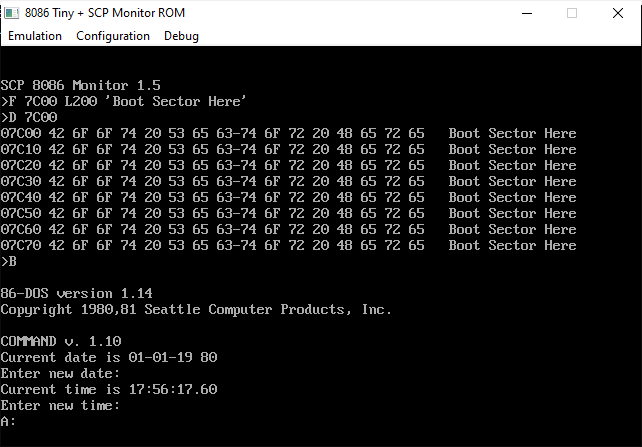
No, the original ROM didn’t just magically work, I had to rewrite all of the console I/O and disk boot routines.
The SCP 8086 Monitor eventually morphed into the DEBUG utility, you can actually find a fair amount of its functions/routines in the MS-DOS 2.11 DEBUG source code released by Microsoft. So yeah, if you want to try it on the IBM PC, just boot into DOS and run DEBUG :).
Notes
- According to John Elliott‘s documentation of CP/M’s DPB, the
SPTfield is the number of 128-byte records per track, not the number of sectors. This is correct as the byte sequence20 00 03 07 00 9B 00 3F 00 C0 00 10 00 01 00can be found in CP/M-86 1.00’sCPM.SYSat offset0x2871. This byte sequence is the default DPB and the first word is theSPTfield. As you can see,SPTis0x20(32) and there are indeed 32 128-byte records in each track of an 8-SPT 5.25″ SSDD floppy disk.